
Build 0.1.0-beta.1 · private Windows beta
Document ABX-OM-001 · Revision C

abraxxxas
abraxxxas · FIELD OPERATIONS MANUAL · DOCUMENT ABX-OM-001 · REVISION C · BUILD 0.1.0-BETA.1
The next groove begins with what you keep.
STATUS: SOFTWARE CANDIDATE FOR A PRIVATE WINDOWS BETA. NOT YET TRIED ON REAL CONTROLLERS OR IN A LONG SESSION.
01Descrizione
Purpose
ABX-OM-001 · REV C
abraxxxas is a live instrument for dark, spacious electronic music. Four parts — KICK, BASS, PERC and AIR — play from an internal clock. You push them away from where they were, keep the part that found something, and let the rest come back on the next bar. Two territories hold two sections of a set; a part can be carried from one to the other. Two bars of what you played can become the atmosphere under what you play next. Everything runs on your computer: no account, no network, no plugin host.
Parts · internal clock
- KICK
- BASS
- PERC
- AIR
Applications
Three exercises in the manual show what the instrument is for, with the built-in example:
- Mission 01— Keep a rhythmic discoverydrift PERC, keep the phrase, bring BASS home.
- Mission 02— Carry an identity across sectionstwo different territories sharing one part.
- Mission 03— Turn a passage into atmospherecapture two bars and play them as AIR.
It is meant for a performer playing standalone, with the mouse or a MIDI controller, recording the master when wanted. It does not run as a DAW plugin, does not sync with decks or other devices, has no audio input, no stereo processing and no stem export.

Signal / Space / Memory
02Feature
Instrument overview
ABX-OM-001 · REV C
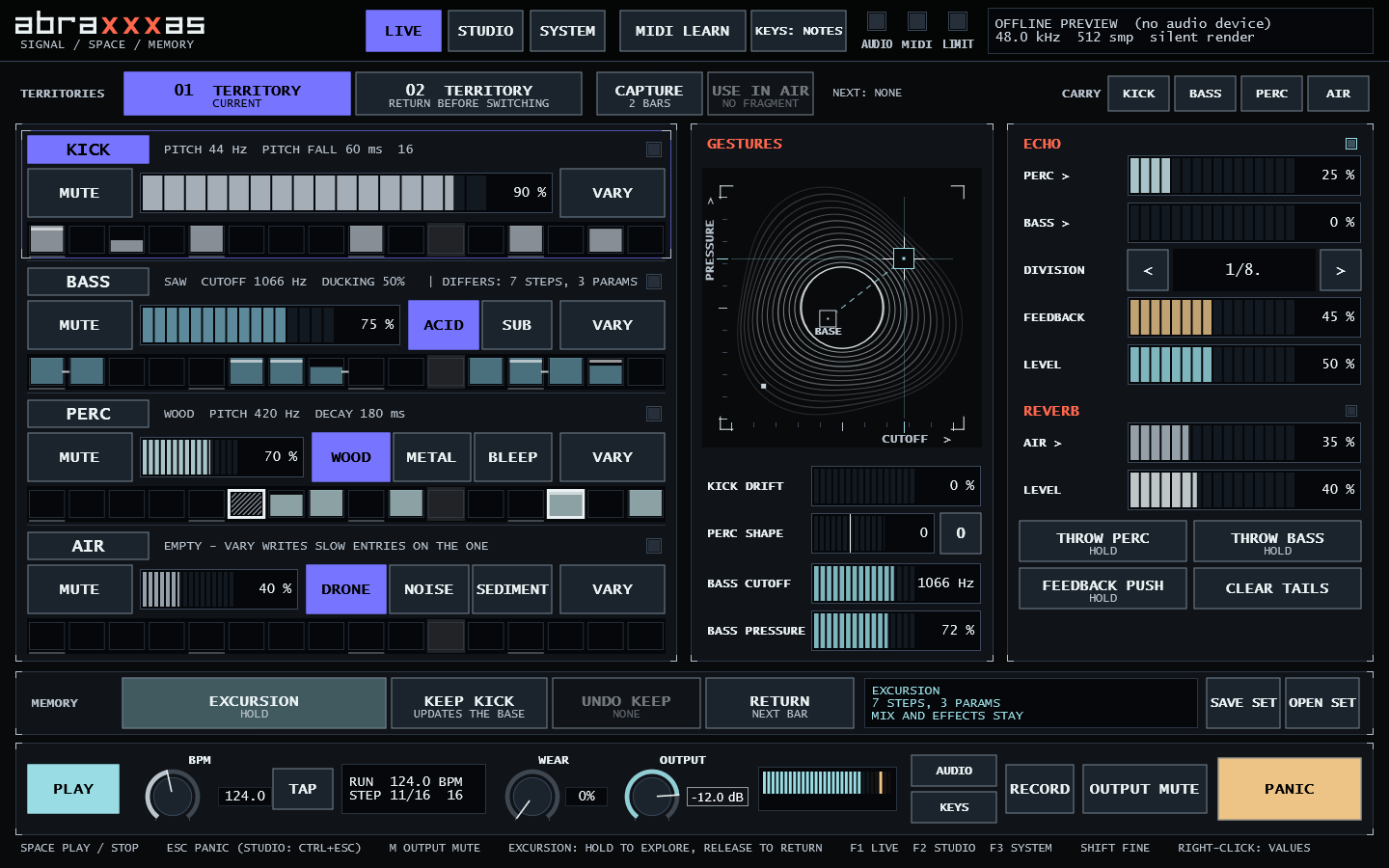
Four actions carry the instrument:
- EXCURSION
- Hold it and change anything: VARY, DRIFT, PERC SHAPE, BASS ORBIT. Release it, and every part returns to its base on the first sample of the next bar. Mix and effects stay as you left them.
- KEEP [part]
- During the excursion, the selected part's pattern and sound become its new base. The sound does not change; that part simply no longer returns.
- TERRITORY + CARRY
- Switch to the other section on the next bar. A part lit in CARRY goes with you and replaces its counterpart there.
- CAPTURE → USE IN AIR
- Record the next two bars of KICK, BASS, PERC and echo, then make them the source of AIR on the next bar.
Status and limitations
Verified on this build
- 148 automated tests, including safe save, set change, SEDIMENT timing on the bar sample, STOP / PANIC / tempo cancellations
- no allocation, lock or file access on the audio thread
- reference render byte-identical after the English interface
- interface readable at 1100 × 760 and 1440 × 900 (off-screen snapshots)
Needs a real test
- listening; real audio interfaces; MIDI controllers and pedals; a 45–60 minute session
- file dialogs and right-click menus by hand
- another PC and user account
Not implemented
- macOS build, ASIO
- external sync, audio input, stereo, plugin hosting
- sample-rate conversion of saved fragments
A SEDIMENT fragment opens only at the sample rate it was taken at; changing the device rate clears an unsaved fragment. Details and the current beta checklist: BETA_STATUS.md.
03Guida
First operation
ABX-OM-001 · REV C
Package.
No downloadable release exists yet: the beta package is shared privately. To build it yourself, see Build and contribute.
Requirements.
Windows 10 or 11, x64; any audio output Windows offers (ASIO is not included); a writable Documents\abraxxxas Sets folder. A MIDI controller is optional.
First sound.
- 01
Start
abraxxxas.exewith the system volume low. Press AUDIO to choose the output if needed. - 02
Press PLAY (Space). KICK and BASS start.
- 03
Press VARY on PERC and on AIR: both receive a phrase.
- 04
Hold EXCURSION, press VARY a few times, then release it: the parts come back on the next bar.
If something stays silent, the manual lists every cause: First sound.
Operating manual
The full manual is a single document: docs/OPERATIONS_MANUAL.md.

- 01System overviewthe parts, the signal flow and the capture point
- 02Before operationdevice, level, folder, build
- 03Controls and indicatorsthe annotated LIVE view; kinds of control
- 04First soundfrom a fresh start, and back to a known state
- 05Pattern and sound preparationlocks, generation, SET BASE
- 06Excursion and memoryKEEP, UNDO KEEP, RETURN, legacy memory
- 07Territories and carryswitching, cancelling, carrying a part
- 08DriftTHIN, SHIFT, ACCENTS
- 09Echo and reverbsends, gestures, STOP / MUTE / CLEAR TAILS / PANIC
- 10Sedimentwhat is captured, when, and what cancels it
- 11MIDI and keyboardMIDI LEARN, pickup, shortcuts
- 12Save, record and recoverset files, fragment files, recovery copy
- 13Troubleshootingproblem → check → action
- 14Referenceall 64 parameters with range, unit and memory scope
Build and contribute
Requirements: CMake ≥ 3.22; Visual Studio 2022 (or Build Tools) with the C++ workload; JUCE 9.0.4.
$ cmake -S . -B build -G "Visual Studio 17 2022" -A x64 -DKONTUR_JUCE_DIR="<path to JUCE>"$ cmake --build build --config Release --parallel$ ctest --test-dir build -C Release --output-on-failure
The executable is build/Kontur_artefacts/Release/abraxxxas.exe. Off-screen snapshots for documentation: abraxxxas.exe --snapshot out.png --size 1440x900 --view live|studio|sistema [--page cassa|basso|perc|aria|trasforma|spazio|mix|tastiera] (the command-line page names are internal identifiers and stay unchanged).
Rules for changes: parameter ids, ranges and set records are persistent identities and only grow; the audio callback never allocates, locks, logs or touches files; every visible control does what it says. JUCE is dual-licensed (AGPLv3 / commercial): settle the licence before distributing binaries.
